Arena of Champions Not Loading? Loading, Connection & Failed to Start Fixes
Updated 2026-11-01
Arena of Champions not loading usually shows up as one of four screens: a Loading screen that never finishes, a Lost the connection to the server message, a Failed to start message, or a game that runs with no sound. Each screen points at a different cause, and the first thing to check is always whether the browser can reach arenaofchampions.live at all.
Each problem gets its own section below: first the steps that usually clear it, then what to do if the same screen comes back. If Arena of Champions not loading keeps happening after those steps, the cause is probably outside the browser, and the last section lists what to write down before you report it.
Arena of Champions not loading: read the screen first
The four problems on this page look different on screen, and each one has its own fix. Match what the game window shows to a row of the table, then go to that section.
| What you see | What it means | Go to |
|---|---|---|
| Loading stays on screen and never ends | The browser never reached the game's login screen, so the connection to the game server is the usual cause | Loading never finishes |
| Lost the connection to the server, with a Reconnect button | The game had signed you in and then the server closed the connection | Lost the connection to the server |
| Failed to start | The game did not start at all, so the browser or the network stopped it before play | Failed to start |
| The game plays but there is no sound | A muted tab, a browser setting or a sound setting, not a broken game | No sound in Arena of Champions |

Check the network before anything else
A browser error page, a timeout, or a blank frame in the game window all mean the browser never talked to the game server. When the browser shows its own error page, nothing inside the game can fix it, so start outside it.
| Situation | What to try |
|---|---|
| The browser shows its own error page | Turn off the VPN or the proxy, then reload |
| The page hangs, then times out | Try a phone hotspot; it is the quickest way to tell your network from the game server |
| Work or school computer | Ask whether the network blocks outside game servers |
| An ad blocker or a privacy extension is on | Disable it for arenaofchampions.live only, then reload |
| A second browser shows the same screen | The browser is not the cause; look at the network again |
Change one thing at a time, so you know which change made the difference. If the browser error page shows up on a second network and in a second browser as well, the problem is on the game server side rather than on your machine.
Arena of Champions not loading: fix each problem
Work through the four problems below in the order they appear on your screen. Each one covers a different way the game fails to start, and each section starts with the steps that usually clear it, then says what to do when the same screen comes back.
Loading never finishes
Loading is the first screen the game shows. If Loading stays on screen and Arena of Champions not loading never ends, the browser has not reached the game's login screen, and the connection to the game server is the usual cause. Start with the network checks above, because they tell you whether the game can run in your browser at all.
Try this first
- A browser error page instead of Loading means the game files never reached the browser, so no step inside the game will help.
- Loading usually takes under a minute on desktop. If it ends, the next screen is the login screen with Play as Guest.
If it keeps happening
- If Loading comes back after a reload on two different networks, the problem is on the game server side rather than on your browser.
- Clearing the cached files for arenaofchampions.live helps when the page opens but the game does not start. It does not help when the browser cannot reach the server at all.
- Open https://arenaofchampions.live/ in a new tab. If the browser shows its own error page, the problem is the network, not the game.
- Turn off any VPN, proxy or ad blocker, then reload. Change one thing at a time, so you know which one made the difference.
- Try another network, such as a phone hotspot. If the game loads there, the block is on the first network.
- On a work computer, ask whether the network blocks outside game servers.
- Wait an hour and try again. This only helps if the server was down for a while.
Lost the connection to the server
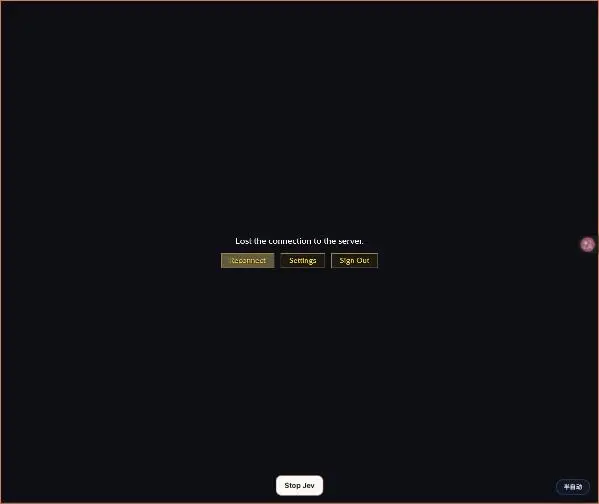
This message comes after the game has loaded and you have signed in as a guest. The game then connects to the game server. If the server closes the connection, the game shows Lost the connection to the server with a Reconnect button.
Try this first
- The message means the connection was open and then closed, so the game itself reached the browser.
- This connection runs on WebTransport, which uses HTTP/3 over QUIC and therefore UDP. A network that blocks UDP can drop it while the site itself still opens.
If it keeps happening
- If Reconnect fails three times in a row on the same network, the block is probably on that network. Try another one before you report it.
- Clicking Play as Guest again after a reload starts a fresh connection, so it is worth one try before you switch networks.
- Click Reconnect once. If Arena of Champions not loading comes back with the same message, refresh the page instead of clicking again.
- If it keeps failing, try a different network. A network that blocks UDP can stop WebTransport from connecting.
- Close other tabs that stream video or games, to rule out a slow connection.
- Note the time and the network you used before you report it.
Failed to start
Failed to start is the message that says the game will not start at all. The steps below are general browser advice rather than a fix for one known cause, so treat them as things to try. If the same message appears in a second browser too, the network is the more likely cause.
Try this first
- One failed start is often a slow load. Reload once and let Loading finish before you click anything in the game window.
- An extension that injects scripts into the page is the usual reason one browser fails where another one works.
If it keeps happening
- If Failed to start comes back in every browser on the same network, the block is on the network.
- If it comes back in one browser only, clear that browser's extensions and cached files for arenaofchampions.live before you try anything else.
- Refresh the page once and wait for the Loading screen to finish.
- Update the browser to its current version, or try a second desktop browser.
- Turn off extensions for this site, then reload.
- Clear the cached files for arenaofchampions.live only. Do not clear all browsing data.
No sound in Arena of Champions
Browsers keep audio muted until a page receives a click or a key press. When the game runs silently, a muted tab or a sound setting is the usual cause.
Try this first
- Click inside the game window once, then press a key. Audio starts after that first interaction in most browser games.
- Settings has Interface, Graphics and Sound tabs, so the in-game volume sits under Settings and then Sound.
If it keeps happening
- If the tab is muted, nothing inside the game can bring the sound back. Right-click the tab and look for Unmute site.
- If other tabs in the same browser have sound, the output device is fine and the game's Sound setting is the place to look.
- Click inside the game window once, then press a key.
- Check that the tab is not muted. In Chrome, right-click the tab and look for Unmute site.
- Check the system volume and the output device.
- Once the game loads, open Settings and check the Sound tab.
Before you report a problem
Reports are easier to act on when they include the same details every time. Write these down before you contact anyone about Arena of Champions not loading:
- The time you tried, and whether it was on a work network or a home network.
- Which message you saw: Loading, Lost the connection to the server, Failed to start, or no sound.
- The browser name and version, and whether a VPN, proxy or ad blocker was on.
- Whether the same page works in a second browser.
Arena of Champions not loading FAQ
Why is Arena of Champions not loading on my computer?
The game loads from arenaofchampions.live, so the first thing to check is whether your computer can reach that address. If the browser shows its own error page, the game never started, and the fix is on the network side. A VPN, a proxy, a firewall or a work network can all block the connection.
Does Arena of Champions not loading mean the game is down?
Not necessarily. A network that cannot reach the game server shows the same screens as a server that is down. Try a phone hotspot: if the game loads there, the server is up and the first network is the problem. If the same screen appears on both networks, the server side is the place to look.
What does Lost the connection to the server mean?
It means the game had signed you in and then the connection to the game server closed. Click Reconnect once, and if it fails again, try a different network. A network that blocks UDP can stop the connection from coming back.
Can clearing my browser cache fix the game if it will not load?
Clearing the cached files for arenaofchampions.live only is a reasonable step when the page opens but the game does not start. It will not help when the browser cannot reach the server, because in that case nothing ever reaches the page to be cached.
Does Arena of Champions load on a phone when it fails on a PC?
Treat a desktop browser as the main path for this page. The login screen offers Play as Guest, email sign-in and Download for Windows, and the in-game controls are keyboard and mouse. If the game fails on a phone as well, open arenaofchampions.live in the phone browser and check whether the Loading screen finishes at all.
Does Arena of Champions not loading work the same in every browser?
If the game loads in Chrome but not in a second browser on the same machine, an extension or a stale cache in the second browser is the usual cause. If no browser on that network reaches the game, look at the network first: a VPN, a proxy or a work firewall blocks every browser on the same machine.
Next steps if the game still will not load
If Arena of Champions not loading continues after the steps above, collect the time, the browser, the network and the message you saw, then decide whether the problem is on your side or on the game server side. Once the game loads, the How to Play guide covers the default keys.
The four screens above cover what the game shows when it will not start: Loading, Lost the connection to the server, Failed to start, and a game with no sound. Anything else in the game window is worth a screenshot before you report it.